title
Here is the easiest way to
put LimoWiz data on a new server.
- Copy the entire limowiz2000 folder from
older server to new server, normally to C: drive. You can use a USB drive
to move the folder.
- Download and install server setup from members page at www.limowiz.com
- Run the LimoWiz setup program and install on new
server and point it to correct installation folder where the copied
folder exists; the default is c:\limowiz2000
- *Share* the limowiz2000 folder on server and give Full Control permission. Security permissions
must also be set to “Full Control” to “Everyone”
user. If you do not Everyone user, click the Add button (as shown
below).
5. Open LimoWiz and make sure LimoWiz has all your data. If it says it is
a trial, it means you did not move the data correctly. Go back to step #1.
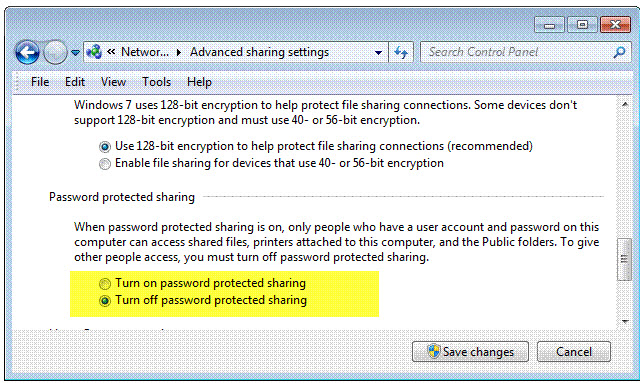
Note: “Turn off password protected sharing” in the advanced
sharing settings.
Install LimoWiz on the Workstations:
- Install workstation setup
on all workstations. Make sure server and workstation have the same
LimoWiz version number.
- Turn off old server so that LimoWiz will not see old
server; this will force workstations to
prompt you for the
new LimoWiz data path.
- Change the data path on all workstations to new shared
limowiz2000 path on new server.
- Open LimoWiz on one of the workstations, then open the Settings, then open the Reports Terms tab, then click the Fix file path of all specified files. Do the same by opening the Email Terms tab, then scroll down and click the Fix file path...button, then save changes.
This is a critical step to make sure the files that can be accessed especially if the new server PC name is different from the old server PC name.
NOTE: make sure you download
and install the REQUIRED DOWNLOADS from members page on server and
workstations. Install CutePDF Writer.
If you want change the old server to a workstation, you must
uninstall LimoWiz from old server, then delete the limowiz2000 folder from the old server drive
where LimoWiz is installed, then run and install LimoWiz workstation setup program.
Do not delete anything from old server until LimoWiz
is working correctly on new server and it has all its data.
Note: exclude the limowiz2000 from anti-virus scanning
to prevent interference with LimoWiz data files and to avoid slow access.